

Storyboard artists: twelve rough takes before lunch
Run the whole board through Fast H3 at 480P for 50 credits a shot, pick the frames that work, and hand the director something moving instead of stills.
Put a sentence in the box, or drop the first frame of the shot. Fast H3 returns a 5–15 second clip with the soundtrack already mixed — then you tweak a word and go again.
Production preview

Fast H3 reads a line of text or one opening still and returns a 5–15 second clip with picture and sound in the same file.
Work at 480P while you hunt for the take, then switch to 768P for the version you keep.
August 2026 scores from Design Arena and Artificial Analysis put this build first for overall quality, prompt understanding, and aesthetics, including the top slot on Design Arena's image-to-video board. Text-to-video is enough on its own; add a last frame only when you need to pin the landing.
Six finished clips. Steal the prompt shape, swap the subject, run your own take on the homepage generator.
Ask for a white kitten after a butterfly in a sunny garden, plus a tracking camera and leaf-filtered light. Fast H3 fills in the rest of the shot.

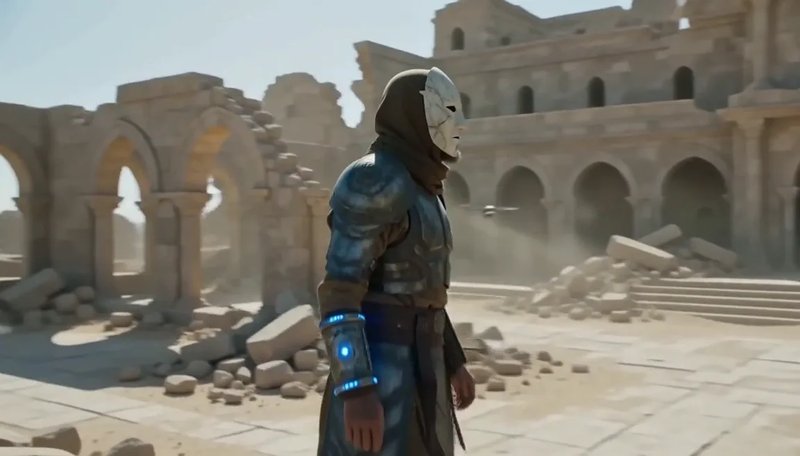
Spell out the first four seconds: a warrior-monk on a cliffside monastery, survey drones overhead. Fast H3 follows the beat sheet instead of inventing a different cut.
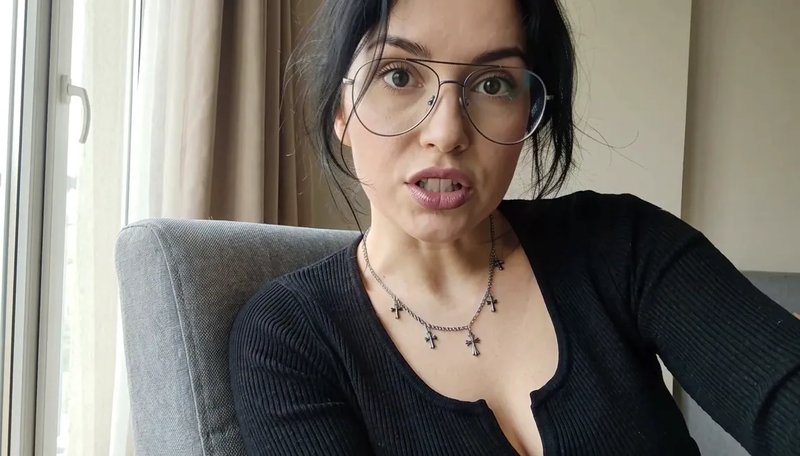
Upload a portrait as the start frame and write the line you want heard. Fast H3 moves the face and records the voice in one pass.
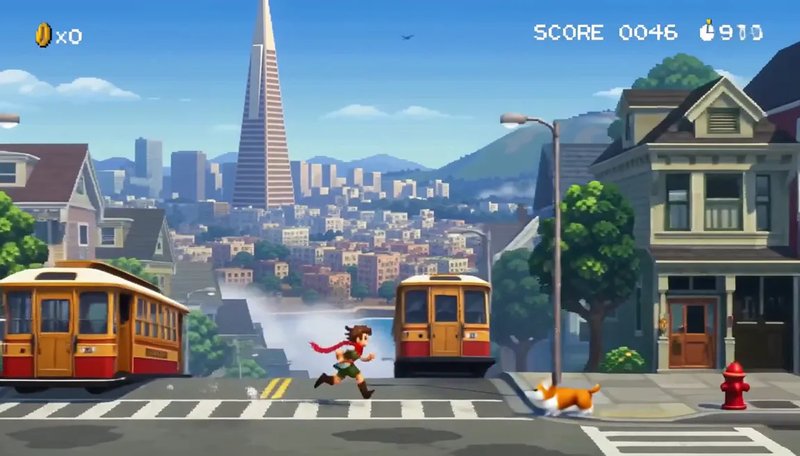
Ask for 16-bit endless-runner footage: jump, duck, a HUD, chiptune. Fast H3 keeps the sprite, the scrolling city, and the soundtrack together.
Call for stop-motion: a round frog in a scarf, a tiny kitchen, stepped 12fps, clay squeaks. Fast H3 holds the cadence and the sound together.

Ask for a slow close-up of a hummingbird at a red trumpet flower, pollen in the air. Fast H3 keeps the blur of the wings and the hum in the same file.

Length is a whole number of seconds. Five is the Fast H3 starting point; stretch it only when the beat needs more room.
Text-to-video offers 21:9, 16:9, 4:3, 1:1, 3:4, and 9:16. Image-to-video copies the shape of the still you upload.
768P is 1344×768 at 24 FPS. Burn cheaper 480P takes until the framing is right, then re-run that prompt on Fast H3 at 768P.
Dialogue, room tone, and effects render in the same pass. Spoken lines are listed as stable in 11 languages.
The start frame is required for Fast H3 image-to-video. Add an end frame only when you need the last pose locked.
Ask for a sign, a label, or an end-card and check the 768P take — the letters are meant to hold.
A single sentence is enough for Fast H3. For image-to-video, upload the opening frame and, if you need it, the closing one.
Set 5 to 15 seconds, 480P, 768P or 1080P, and a frame from 21:9 to 9:16. You pay per second of finished output.
Fast H3 returns picture and sound together. Keep the take, or edit the prompt and generate again.
When the brief lands at nine and the review is at ten, this is what a 5–15 second clip with sound gets used for.
Run the whole board through Fast H3 at 480P for 50 credits a shot, pick the frames that work, and hand the director something moving instead of stills.
Cut six 5-second openers, put them in front of the audience, then spend 100 credits on the one that actually held attention.
One sentence about the product, one 9:16 or 16:9 frame, and Fast H3 hands back a clip with sound before the tweet is drafted.
Describe the missing establishing shot, match the aspect ratio of the timeline, and Fast H3 drops a take straight into the edit.
Upload the product photo as the start frame; Fast H3 adds the turn, the light, and the room sound for a listing or a story ad.
A headshot plus the opening line becomes a 5–15 second talking intro for the lesson page, dialogue already synced.
You pay for finished output only: 10 credits a second at 480P, 20 at 768P, 35 at 1080P. A 5-second 1080P take costs 175 credits. Plans start at $19.90 for 1,000 credits a month.
Enjoy Limited-Time 30% OFF!
Fast H3 is this site's video generator, built on a tuned build of MiniMax H3 and pointed at the fast lane of H3 video. It is an independent product: not affiliated with, endorsed by, or sponsored by MiniMax, whose own product is still named MiniMax H3.
August 2026 benchmarks timed a 5-second 768P clip at under 3 seconds of model time, and Design Arena measured more than 50× the speed of MiniMax H3 at the same quality. Queue time at busy hours is added on top, so plan on seconds to a minute per take, not a fixed SLA.
Not by the August 2026 numbers. The build behind Fast H3 topped Design Arena's image-to-video board at Elo 1,341, ahead of the base model's 1,333, and placed first for overall quality, prompt understanding, and aesthetics in Artificial Analysis and Design Arena evaluations.
No. The cheapest take — 5 seconds at 480P — is 50 credits, so the first clip needs a plan. The $19.90 month loads 1,000 credits: about 20 drafts at 480P, or 10 finished 5-second takes at 768P.
Stay at 480P, where a second of Fast H3 output is 10 credits: 50 for a 5-second take, 150 for the full 15 seconds. Switch to 768P — 20 credits a second — only for the take you keep.
Yes. Image-to-video needs a start frame and takes an optional end frame to lock the final pose. The clip keeps the aspect ratio of the still you upload, and the prompt still directs the motion and any spoken line.
Whole seconds from 5 to 15, defaulting to 5. Fast H3 text-to-video offers 21:9, 16:9, 4:3, 1:1, 3:4, and 9:16, with 16:9 as the default; image-to-video follows the start frame instead.
Yes. Picture, effects, and dialogue render in one pass, so the file that comes back is already synced. Spoken lines are listed as stable in Arabic, Chinese, English, French, German, Italian, Japanese, Korean, Portuguese, Russian, and Spanish.
Choose 480P, 768P or 1080P, with 480P selected by default; 768P renders at 1344×768 and 24 frames per second. There is no 2K lane here — MiniMax's own hosted H3 has one, Fast H3 does not.
On a paid plan, yes: outputs are yours for lawful commercial work. Trademarks, likenesses, and copyrighted material you put in the prompt still need clearing on your side.
Hunt at 480P. Keep the 768P. Both files already have sound.